
Support & help
Find manuals, specifications, hi-res images and answers to common questions for Carl Martin products.
If you need personal assistance, troubleshooting, or warranty support, we recommend starting with the store or dealer where you purchased your product. They know your local market and can usually help you fastest.
Products purchased directly from Carl Martin are fully supported by us. For all other purchases, your local dealer or distributor is the correct first point of contact.
Product information & downloads
Use the support list below to access user manuals, specification sheets, hi-res images and frequently asked questions for each Carl Martin product.
Most common questions can be answered immediately by checking the FAQ and documentation for your specific product.
Need personal assistance?
For technical issues, warranty questions, or service requests, please contact the dealer where you purchased the product. They can assist directly or coordinate with the regional distributor if needed.
If your dealer is no longer available, or if you purchased directly from Carl Martin, you are welcome to contact us for further support.
Product support library
Select your product below to find manuals, technical specifications, hi-res images and frequently asked questions. All files and information are publicly available.
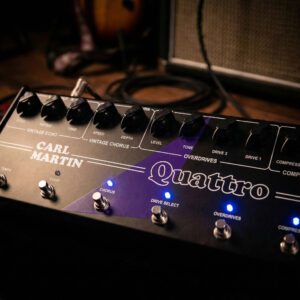
What is the Carl Martin Quattro?
The Quattro is an all-analog multi-effects pedal that packs four of Carl Martin’s vintage-style effects into one board. It includes: a Compressor/Limiter, a Dual Overdrive (Crunch and High-Gain), a Vintage Chorus, and an Echo (delay) with Tap Tempo. Essentially, it’s like having a small pedalboard of Carl Martin’s best analog effects in a single unit, with an effects loop in between (so you can insert an external pedal between the overdrive and chorus sections if desired). It’s designed for maximal tone quality – using high-headroom ±12V internal power – and simplicity (no menus, no digital screens; just knobs and footswitches).
Are all the Quattro’s effects analog?
Yes – that’s a big selling point. The compressor and overdrives are analog (based on Carl Martin’s acclaimed standalone units), the chorus is analog (bucket-brigade style), and the Echo is also analog-voiced and uses a bucket-brigade or analog/digital hybrid but analog signal path (Carl Martin calls it “vintage style Echo;” likely it’s using an analog BBD or at least filtering to sound analog). It has analog dry-through, and the entire unit runs internally at ±12V for high headroom. The footswitching is mechanical/electronic but no digital processing in audio. That’s why it’s praised for “studio quality” sound – it’s basically these four analog circuits put together with an internal power supply (the Quattro plugs into mains, giving ±12V internally). No digital menus or memory; what you dial is what you get. So you sacrifice presets or any digital versatility for pure analog tone. It’s aimed at players who want simplicity and quality akin to using quality single pedals or even studio rack.
Does the Quattro have an internal power supply or do I need an adapter?
The Quattro includes an internal power supply. It has a built-in regulated power section that takes AC mains (110-230V) and converts it to ±12V for the circuits. So you actually plug it directly to the wall (there’s an AC input on it or a fixed power cord, depending on version). The Pro versions used to have that. The manual snippet: “switchable (110-230 V) fused AC input” and “eight isolated outputs etc” is general, but specifically Quattro does mention “on-board regulated ±12V power supply”. So yes, no 9V adapter needed – it uses mains, which means one less thing on your board. This design allows use of high-voltage components for better tone and headroom. Just ensure you have the correct voltage selected if it’s switchable (some units have a 115/230V slider). It also means it’s one of the heavier “pedals” since it’s basically half-pedalboard half-power unit.
Can I use the effects independently, for example, can the echo be on while the drive is off, etc.?
Yes – each section has its footswitch, so you can mix and match. For instance, you can run just the echo by itself (Comp off, Drive off, Chorus maybe off or subtle, Echo on). They’re designed to be chainable in any combination. The only slight caveat: the Chorus doesn’t have a footswitch, so to “bypass” chorus you’d turn Depth to zero (effectively no modulation). If you want it out of the circuit entirely, I suspect at Depth=0 it’s basically transparent because many analog choruses at minimum depth are effectively bypassed (maybe a slight buffer only). But otherwise, yes, you could have comp and echo for a compressed ambient clean, or drive and chorus for 80’s rock tone, etc. They’re independent in control and can all be engaged together if you like (leading to something like: compressed, overdriven, chorused, echo-laden lead – which might be glorious!). The inclusion of the series effects loop also means if you don’t want to use, say, the internal compressor, you could loop out another effect after drive, etc. But general operation: it works as a normal pedalboard where you stomp each effect in/out as needed.
Is the Quattro programmable or MIDI-switchable?
No, the Quattro is fully analog and old-school – no MIDI or presets. It’s meant for those who want high-quality analog effects without multi-fx menus. So you cannot program combinations; you have to stomp multiple footswitches if you want to, say, turn off compressor and turn on drive at the same time (that’s two stomps). The footswitches are spaced for a reasonably easy multi-stomp though. Some players might use an external loop switcher to control it (the Quattro’s design doesn’t really allow separate in/out per effect, aside from the one loop insert; it’s a series chain internally, so it’s not easily externally switchable by section except using its own switches). So it’s not for those who need patch changes, but more for the “analogue purist” who doesn’t mind a bit of tap dancing. However, because it’s laid out logically, many find it intuitive and simpler than some digital multi-fx which trade that for complexity.
How does the Quattro’s sound compare to individual pedals?
xtremely favorably. In fact, inside it basically is individual Carl Martin pedals. The compressor is their well-regarded comp/limiter (same circuit as their single pedal, just fewer knobs because threshold/response fixed). The overdrives are based on their PlexiTone style circuits (two channels of drive with shared tone – sounds very amp-like and warm). The chorus is described as “Vintage Chorus” – likely an analog BBD chorus akin to an old CE-1 style (rich and not sterile). The echo is particularly praised: it’s analog-voiced, around 600ms, with tap tempo – essentially similar to their Red Repeat or DeLayla circuits, giving lush repeats that can get a bit dark for ambience. They run internally at ±12V, so the headroom and clarity might even exceed some 9V pedals. Many users and reviews note the sound quality is top notch, with no noticeable tone suck when all sections are off (because the unit likely has a high-quality buffer in/out). Also, noise levels are low – e.g., the comp is quiet, the drives are quiet relative to gain, etc. You’re essentially paying for 4 high-end pedals in one, and that’s exactly the sound you get. So yes, it stands up to individual boutique pedals well; p
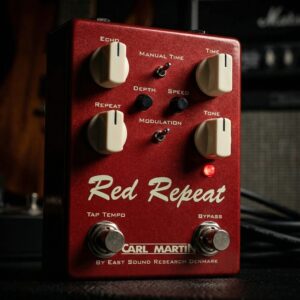
What kind of delay is the Carl Martin Red Repeat?
The Red Repeat is an analog-voiced digital delay pedal capable of up to 600 milliseconds of delay time. It’s voiced to sound like a warm vintage tape or analog echo – the repeats are intentionally “warm” and slightly dark, not crystal-clear clinical. The 2016 edition of the Red Repeat also includes modern features like Tap Tempo and a Modulation option to add wow/flutter to the repeats. In essence, it’s a compact delay that ranges from quick slapback to moderate ambient repeats, giving you that classic echo sound with easy control.
How do I set the Tap Tempo on the Red Repeat?
The Red Repeat 2016 has a footswitch dedicated to Tap Tempo. There’s a small toggle switch labeled “Manual Time / Tap Tempo”. Flip that switch toward “Tap Tempo” (the Red Repeat logo side), and then use the right footswitch to tap in your desired delay tempo (tap twice or more in rhythm). The pedal will ignore the Time knob and use your tapped tempo. If you flip the toggle switch away (to Manual), then the delay time is set by the Time knob as usual. This means you can choose on the fly whether to dial a tempo or tap it – very handy. An LED likely blinks to show the tempo as you tap. Remember, max delay is ~600ms, so if you tap slower than that, it’ll probably just max out.
What does the Modulation switch do?
The Red Repeat has a two-position Modulation mini-switch. When you engage Modulation, it activates an analog-style wow & flutter effect on the delay repeats (kind of like tape warble). There are two tiny trim knobs for Depth and Speed of modulation on the pedal (the “black mini-pots” mentioned). You can dial those internally or via small external knobs (depending on design) to set how pronounced the modulation is. Essentially, turned on, it can make your echoes wobble slightly like an old tape echo (from subtle chorusy shimmer to more obvious seasick wavering at extreme settings). Turned off, you get straight repeats. It’s a cool feature for those who love the character of vintage tape echoes with their imperfections. Many players keep it subtle – just to give repeats some depth.
Is the Red Repeat an analog delay?
No, it’s a digital delay pedal that’s voiced to sound analog. It uses a digital chip (likely PT2399 or similar) with filtering to roll off highs on repeats, mimicking analog and tape delay characteristics. The upside: it’s more reliable, and you get extras like tap tempo and modulation which pure analog delays often lack. The downside: it’s limited to 600ms, similar to many analog units (which for most guitar uses is fine). But make no mistake, in blind tests many say it sounds very analog-ish – dark repeats, slight compression, and none of that crisp “digital ping” on echoes. So you get the warmth of analog with the convenience of digital control.
What are the controls on the Red Repeat?
The main knobs are: Echo (which is the mix level of repeats – from barely audible to about equal with dry), Tone (which adjusts the brightness of the repeats only – fully clockwise yields brighter repeats, though still somewhat dark; fully counter-clockwise makes repeats very dark and muffled), Time (delay length, 0 to 600 ms), and Repeat (feedback – how many repeats, from one single echo up to oscillation). Then there’s the Manual/Tempo toggle, the Modulation on/off toggle with Depth/Speed trim controls, and two footswitches: one for effect Bypass and one for Tap Tempo. The layout is user-friendly: basically set your delay sound with the knobs, and use the toggles to engage tap mode or modulation if desired.
Does the Red Repeat have true bypass and do trails cut off when bypassed?
The Red Repeat is buffered bypass – it uses an active circuit when bypassed to allow delay trails to spillover. This is generally how it’s described: when you turn it off, any existing echoes fade out naturally rather than abruptly stopping. That’s a plus for musicality. The buffer also ensures no tone suck and easier integration at end of chain. So, not true bypass, but deliberately so – to preserve the effect’s decay and maintain output clarity. The buffer in this pedal is well-regarded (no tone coloration, and they even include an optional input buffer switch on some units). So expect smooth operation. If you require true bypass (some rare cases, like running it 100% wet in parallel rig), that might be a downside, but for most, the trails and buffer are desirable features.
How noisy is the Red Repeat? Does it hiss with high repeats or Tone high?
It’s pretty quiet for a delay. The repeats are intentionally dark, which also helps mask noise. Even so, the 2016 version improved the signal-to-noise; users and reviews often mention the clarity of the dry and relative quietness of operation. If you dime the Echo level and have modulation and very high feedback, you might hear a little noise as it self-oscillates (normal for analog-style delays). But in normal use, it’s not a noisy pedal. It also has a decent output level – unity is around noon on Echo knob, meaning it can slightly boost repeats if needed without adding noise floor. Always use a quality power supply (standard 9V DC, ~60 mA draw). Some older digital delays could be hissy, but this one is praised for analog-like warmth without the old analog hiss. Premier Guitar noted that even though it’s not a long delay, it “sounds and feels spacious” and can go from gentle to aggressive modulation without weird noise. So noise is not a concern here beyond what any delay would normally produce.
Can the Red Repeat self-oscillate?
Yes, if you turn the Repeat knob up high (past about 3 o’clock), the feedback will go into self-oscillation (runaway repeats). This can be used creatively – some players like to make spaceship noises or swelling waves of sound by manipulating the Repeat knob at the verge of oscillation. With modulation on, oscillation can become even more textural and wild (almost synth-like). Just be careful with volume – oscillation can get loud. The Red Repeat’s design does allow it, as indicated by Brian May joking reference in a review about “Brian May would ask what’s going on in here?” when doing crazy repeats. The pedal’s range is tuned so that it won’t oscillate uncontrollably unless you intend it (feedback at max). At more sane settings, it will give a healthy number of repeats then naturally die out, which is ideal for musical echo usage.
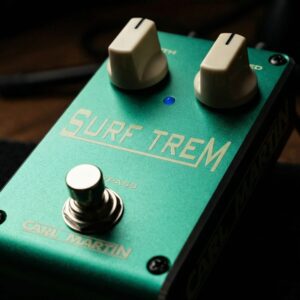
What is the Carl Martin Surf Trem?
The Surf Trem is a straightforward, vintage-style tremolo pedal. It’s designed to recreate the smooth, swaying tremolo sound of 1950’s and 60’s American tube amps (hence “Surf” Trem – think Fender amp tremolo tones used in surf music and early rock). It has just two knobs: Speed and Depth, exactly like old amp trems, making it super easy to dial in. If you want that classic throbbing trem (from subtle shimmer to deep “stuttery” chop), the Surf Trem delivers it in a simple format.
How do I control the tremolo on the Surf Trem?
Use the Speed knob to set how fast the volume oscillates (from slow, swampy pulses at low settings to rapid flutter at high settings). Use the Depth knob to set how intense the volume modulation is. At minimum Depth, the effect is very shallow (almost imperceptible wobble); at max Depth, it’s very deep (full on/off chop between loud and soft – but note, the Surf Trem doesn’t get too choppy; even max remains somewhat smooth, which is ideal for musicality). These two controls emulate the trem circuit of old tube amps (which often labeled them “Speed” and “Intensity”). No waveform knob – it’s a fixed waveform (a smooth sine/triangle blend) that’s voiced like vintage amp trems. So really, just set the speed you like for the song’s tempo and depth for how noticeable you want it, and you’re set.
Is the Surf Trem a true bypass pedal, and will it color my tone when off?
The Surf Trem (2018 edition and onward) is a true bypass pedal in a lightweight housing. Earlier big-box versions were buffered, but the latest Vintage Series (small anodized aluminum one) is indeed true bypass (and even the heavy-duty switch implies that). It also features jacks on top and a low current draw, and can run on battery or adapter. When off, it’s completely out of your signal; it will not color or affect your tone. When on, users report it’s very transparent aside from the intended volume modulation – it doesn’t boost or cut your overall tone frequencies. In the Vintage Guitar review snippet, they specifically noted switching it in/out did not color tone or add noise. So you can confidently leave it in your chain.
How does the sound of the Surf Trem compare to an amp’s built-in tremolo?
Very close – that’s exactly its design goal. It uses an opto-coupler circuit derived from the Carl Martin TremO’Vibe (which was their larger tremolo/vibe pedal), providing a lush, round waveform trem (more like a sine wave trem, not a square wave chop). At low Depth, it’s subtle and “transparent,” just like dialing down an old amp’s trem intensity for a gentle shimmer. At high Depth, it can get pretty deep – in fact deeper than some amp trems – giving a pronounced effect but still with that smooth wave (not hard on/off). The Speed range goes from really slow (several seconds per cycle) to fairly fast (almost machine-gun trem, though it won’t reach ring-mod speeds – it’s musical range). People comparing it to Fender amp trems often say it nails that character: warm, not clicky or choppy, and “didn’t add any noise”. In a blind test, you’d likely feel it as an authentic tube bias-trem or optical trem sound. So basically, it gives you amp tremolo without needing the amp’s onboard one – perfect if your amp doesn’t have trem or if you want footswitch control and two knobs up front.
Does the Surf Trem work well with other pedals (overdrive, etc.)?
Yes – tremolo is fundamentally just volume modulation, so it typically plays nicely with other effects. Common setup: you might put the Surf Trem after overdrives in your chain (this mimics how amp tremolo comes after the preamp gain in an amp). That way, your drive tone is being modulated. The Surf Trem can definitely handle being after distortion – it’s actually very cool for that raunchy chopped distortion tone used in modern rock. Conversely, some might put it before dirt for a different, more subtle feel (the distortion compresses some of the trem’s variance, making it milder). Either way, the Surf Trem’s output is low impedance (since it’s active when on, and when off true bypass but your next pedal likely has input buffering), so it won’t mess up tone. It can also go into an amp’s effect loop if desired (because it’s essentially akin to an amp trem circuit – though it’s not necessary unless you want the trem strictly post preamp distortion). It’s a quiet pedal, so it won’t introduce hum even if chain after fuzz, etc. Only thing: if using very high gain, a trem will make the noise floor audible on the “lows” (when volume goes down, you hear amp hiss swell). That’s physics – n
Does the Surf Trem have a volume drop or boost when engaged?
It is designed not to. Vintage Guitar’s review said switching it on did not change tone or add noise, implying unity volume. Most analog trems are unity at center; and because Depth doesn’t fully silence your signal except at peaks, the perceived loudness remains about the same. The Surf Trem also has an internal trim for level (older wide box version had, not sure if small one does; likely not user adjustable in new one). But user reports and design suggest it’s unity gain – so you shouldn’t hear a jump or drop when engaging the trem. If you do sense a slight drop at very high Depth, that’s common (since at deep depth, your ear might perceive average loudness a tad lower as it spends more time at low volume). But it’s minimal. In a band mix, it will cut through fine. If needed, you could always place a clean boost after it, but likely unnecessary.
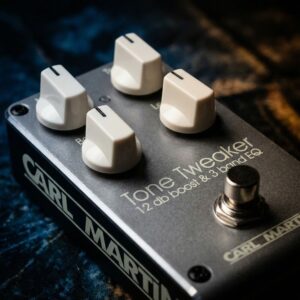
What is the Carl Martin Tone Tweaker?
The Tone Tweaker is a combination 12 dB clean boost and 3-band EQ pedal. It’s essentially an active tone-shaping tool: you get an adjustable Bass, Mid, Treble EQ section and up to +12dB of overall boost available. It’s designed to let you fine-tune your guitar’s tone (hence “Tone Tweaker”) – whether that’s adding warmth to a thin sound, taming harsh highs, or just giving your signal a clean lift for solos.
How do the controls work?
The pedal has five knobs. Three are for EQ: Bass, Mid, Treble – active controls that cut or boost their respective frequency bands. Then there’s a Level knob which controls the overall output/boost (up to +12dB at max). And lastly a Master On/Off footswitch (the pedal is single-footswitch; it doesn’t have separate footswitch for boost vs EQ – it’s all engaged together). Internally, it also has an “internal voltage booster” – not a control, but a design feature raising headroom so even when boosting frequencies, it stays clean and doesn’t distort easily. So, practically: set your EQ knobs to taste (they’re flat/neutral around noon), and adjust Level for how much boost you need. If you want it purely as an EQ with no volume change, set Level to unity (around 10-12 o’clock depending on EQ settings). If you want it as a boost, crank Level higher. It’s quite straightforward – like having an amp’s EQ section in pedal form, with an added volume boost if desired.
Is the Tone Tweaker transparent? Does it affect my tone when knobs are neutral?
Yes – with Bass, Mid, Treble set at 12 o’clock (neutral) and Level at unity, the Tone Tweaker is very transparent (it uses high-quality active EQ circuits that keep your core tone intact). The signal goes through a buffer/active circuitry (the pedal is buffered bypass by design), but that buffer is studio-grade – meaning, if anything, it might even improve signal clarity over long cable runs. When engaged and set flat, you shouldn’t hear any difference except maybe a slight tightening of tone due to the low output impedance of the pedal. Essentially, it can be used as a “tone insurance” buffer even without EQ’ing, or as a very clean boost with EQ flat. And of course, once you start turning knobs, it intentionally affects tone (that’s the point!). But in doing so, it’s still very clean – boosting or cutting frequencies doesn’t introduce noise or weird artifacts. It’s described as subtle yet powerful in effect.
What can I use the Tone Tweaker for?
Many things! Here are some common uses:
Solo Boost: Kick it on for leads – use the EQ to maybe add a little mid and treble, and Level to boost volume so your solos cut through. It preserves your tone while making it louder and more focused (almost like a amp’s EQ footswitch).
Fixing Problematic Guitars or Amps: If you have a guitar that’s a bit thin or bright, you can dial in more Bass or cut Treble to sweeten it. Or if your amp is dark, add some Treble presence or upper mids. It’s like having a fine-tuning post-EQ for your rig.
Always-on Tone Enhancer: Some players leave it on all the time as an always-on preamp to “sweeten” their clean and dirty tones. For example, adding a touch of Mid can make your guitar sound more full in a band mix. It’s subtle but effective – hence the “tweaker” name, it’s for those last 5-10% adjustments.
Acoustic/Electric versatility: It’s also great if you switch between guitars – say a single-coil Strat and a humbucker Les Paul. You could stomp it when using one guitar to compensate (e.g., boost mids for the Strat or cut boomy bass for the Les Paul) to get a consistent tone across instruments.
As an EQ in effects loop: If your amp lacks a
Is the Tone Tweaker pedal noisy, especially when boosting treble or using a lot of boost?
No, it’s designed to be extremely low-noise. Carl Martin gave it a buffered bypass and high headroom internal power, which means even at +12dB boost it stays clean and quiet. Of course, boosting any frequency will also boost any noise present from your guitar or previous pedals. For example, if you crank Treble and your single-coils hum, that hum’s high-frequency portion will get louder. But the pedal itself doesn’t introduce hiss. In fact, one key feature is “no added noise” despite powerful EQ – it’s mentioned that it provides “pure, clean power for your effects” (borrowing phrasing from power supplies, but in context it means it won’t mess up your noise floor). If you experience noise, it’s likely from other sources or a power supply issue. Use a good isolated power source for it (draw is modest, around 60 mA). The internal voltage booster and buffered design keep it stable and quiet. Users generally report that even boosting highs doesn’t introduce hiss – which is a testament to its circuitry quality.
Why is it buffered bypass and what does that mean for me?
The Tone Tweaker is a buffered bypass pedal, meaning when the pedal is off, your signal still goes through an active buffer circuit. Carl Martin chose this to ensure that even in bypass, your tone remains strong (no high-end loss over long cables). This buffer is very neutral and actually beneficial if you have other true bypass pedals – it’ll prevent tone suck in a big pedalboard. The only practical difference: if you have a fuzz or other pedal that likes to “see” your guitar’s direct impedance, placing Tone Tweaker (or any buffer) before it could change how that fuzz responds. But typically, you’d place Tone Tweaker later in chain or as an always-on type device. In summary, the buffered bypass is a plus for most, as it preserves signal clarity and eliminates any popping or switching noise. It also allows the EQ to smoothly come in/out without abrupt jumps in tonal character.
If you cannot find the information you need here, or if your issue requires hands-on service, please contact the dealer or distributor where the product was purchased.